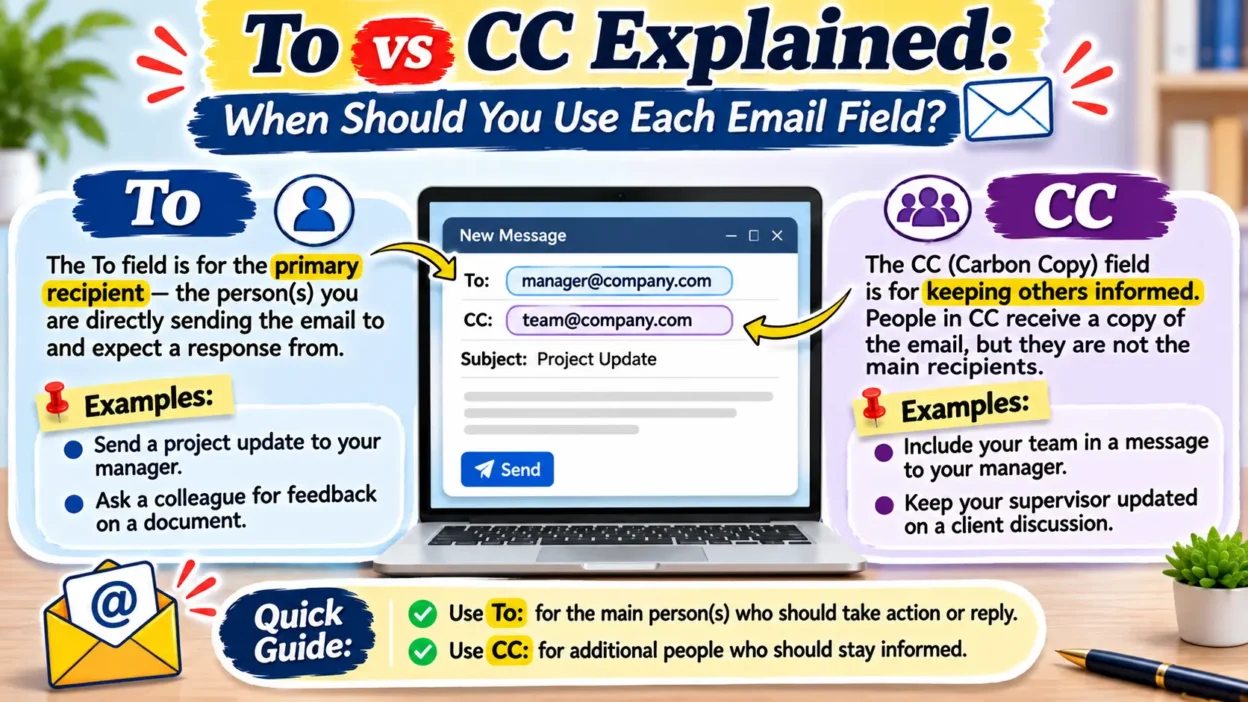
When writing an email, understanding to vs cc helps you communicate clearly and avoid confusion. Both fields allow you to send messages to multiple recipients, but they serve different purposes. The To field identifies the main person you want to contact, while CC keeps additional people informed about the conversation. For example, you might send a project update to your manager in To and add your coworkers in CC so they can follow the progress. Knowing when to use To, CC, and BCC makes your emails more organized and professional. Let’s explore their meanings, differences, examples, and common mistakes so you can use each field correctly.
⚡To vs CC
| Term | Meaning | Usage | Category |
|---|---|---|---|
| To | Primary email recipient | Someone who needs to respond or act | Email field |
| CC | Carbon copy | Someone who needs information | Email field |
| BCC | Blind carbon copy | Someone who needs a private copy | Email field |
Quick rule: Use To for people who need to take action, CC for people who need to stay informed, and BCC when you want to hide a recipient’s email address from other recipients.
📖 What Does To Mean in an Email?
The To field identifies the main recipient of your email. You enter the email address of the person you want to contact directly, especially when you expect that person to read, respond, make a decision, or complete a task.
For example, if you email your teacher to ask about an assignment, you should enter the teacher’s address in the To field.
Example:
To: sarah@example.com
Subject: Assignment Submission
Hi Sarah,
Could you please review my assignment and share your feedback?
Thank you!
Here, Sarah serves as the primary recipient because the sender expects her to review the assignment and respond.
Pronunciation and Meaning
- To: Pronounced /tuː/ or /tə/ in natural speech.
- Part of speech: Preposition in ordinary English; recipient-field label in email.
- Meaning: Indicates the person or destination receiving a message.
- Usage: Direct communication, requests, questions, and instructions.
📩 What Does CC Mean in an Email?
CC stands for carbon copy. The CC field allows you to send the same email to additional people who should know about the conversation but do not necessarily need to respond or complete a task.
The term comes from carbon paper, which people historically used to create duplicate copies of written documents. Modern email systems use CC to share messages with additional recipients.
Example:
To: sarah@example.com
CC: john@example.com
Subject: Project Meeting Update
Hi Sarah,
Please confirm the meeting schedule for Friday.
Thanks!
In this example, Sarah receives the direct request, while John receives a copy to stay informed.
Pronunciation and Meaning
- CC: Pronounced “see-see.”
- Full form: Carbon copy.
- Part of speech: Noun or verb in everyday email language.
- Meaning: A visible copy of an email sent to an additional recipient.
People also use CC as a verb. For example, “I’ll CC my manager on this email.”
🔍 To vs CC: Key Differences Explained
Although both fields deliver the same email, they communicate different expectations.
| Difference | To | CC |
|---|---|---|
| Main purpose | Direct communication | Sharing information |
| Recipient role | Primary recipient | Secondary recipient |
| Expected action | Often expected | Usually not expected |
| Visibility | Visible to recipients | Visible to recipients |
| Reply option | Reply or Reply All | Reply or Reply All |
| Best situation | Requests and instructions | Updates and notifications |
The most important difference involves responsibility. When you place someone in To, you usually direct your message toward that person. When you add someone in CC, you generally want that person to understand what is happening without assigning them the main responsibility.
✉️ To vs CC vs BCC: What’s the Difference?
To understand email recipient fields completely, you should also learn about BCC.
BCC stands for blind carbon copy. It sends someone a copy of your email without showing their address to other recipients in the To and CC fields.
| Email Field | Full Meaning | Address Visibility | Main Purpose |
|---|---|---|---|
| To | Direct recipient | Visible | Main communication |
| CC | Carbon copy | Visible | Keeping people informed |
| BCC | Blind carbon copy | Hidden from other recipients | Recipient privacy |
For example, imagine sending an announcement to 30 customers. You can add your own address in To and place the customers in BCC. This approach prevents customers from seeing one another’s email addresses.
Remember that BCC does not guarantee complete confidentiality. A BCC recipient can still share or forward the message.
📝 10 Examples of To vs CC in Email
These examples demonstrate how people use To and CC in everyday and professional communication.
| Example Sentence | Meaning |
|---|---|
| Please send the report to your manager. | Your manager receives the direct message. |
| I added my supervisor to CC. | The supervisor receives an additional copy. |
| Sarah is in To because she must approve the document. | Sarah needs to take action. |
| John is in CC to follow the project updates. | John needs information. |
| Please CC the marketing team on this email. | The marketing team should stay informed. |
| I sent the invitation to the event organizer. | The organizer is the primary recipient. |
| My assistant received a CC of the confirmation. | The assistant received an additional copy. |
| Please put the department head in To. | The department head should handle the request. |
| I CC’d my colleague on the meeting schedule. | The colleague received the schedule for awareness. |
| Add the client to To and the project manager to CC. | The client receives the direct message, while the manager stays informed. |
💼 When Should You Use To and CC?
Choosing the correct field depends on the recipient’s responsibility and involvement.
Use To When:
- You expect someone to answer your question.
- You assign a task or responsibility.
- You request approval or feedback.
- You contact a customer directly.
- You send instructions to a team member.
Use CC When:
- You want your manager to know about an update.
- You share project information with coworkers.
- You keep stakeholders informed.
- You document an important conversation.
- You introduce relevant people to an ongoing discussion.
A useful rule is to ask yourself whether the recipient needs to act or simply stay informed. This question usually makes the decision easy.
🔤 Synonyms and Related Terms for To and CC
To and CC function as technical email labels, so neither has a perfect synonym in every context. However, the following expressions describe similar communication roles.
| Synonym or Related Expression | Meaning |
|---|---|
| Primary recipient | Main person receiving an email |
| Main recipient | Person directly addressed |
| Direct recipient | Person receiving a direct message |
| Main addressee | Person an email addresses |
| Secondary recipient | Additional person receiving a copy |
| Copied recipient | Person included through CC |
| Additional recipient | Another person receiving the email |
| Information recipient | Person receiving an update |
| FYI recipient | Person receiving information |
| Email contact | Person involved in email communication |
| Addressee | Person receiving a message |
| Carbon copy | Additional visible email copy |
| Blind carbon copy | Hidden email copy |
| Recipient list | All addresses receiving an email |
| Email distribution | Sending a message to multiple recipients |
Important: These expressions describe related roles or functions. They do not replace To and CC as actual email fields.
⚠️ Common To vs CC Mistakes
People sometimes confuse these fields or include recipients without considering their responsibilities.
| Mistake | Correct Usage |
|---|---|
| Adding everyone to To | Put secondary recipients in CC when appropriate. |
| Using CC for someone who must approve a task | Put the responsible person in To. |
| Hiding a recipient’s address with CC | Use BCC instead. |
| Expecting every CC recipient to respond | Explain directly when you need a response. |
| Copying unrelated coworkers | Include only relevant recipients. |
| Using CC for private communication | Use BCC when recipient privacy matters. |
| Forgetting to check recipient addresses | Review every address before sending. |
| Sending confidential information to unnecessary recipients | Limit the recipient list. |
| Replying to everyone unnecessarily | Use Reply when only the sender needs your response. |
| Assuming CC recipients cannot reply | Remember that CC recipients can use Reply All. |
🌐 Where Do People Use To and CC?
People use these email fields across different communication settings.
Daily communication: You can put a friend in To when you invite them somewhere and CC another person who needs the details.
Business communication: Employees use To for direct requests and CC for managers, supervisors, and project stakeholders who need updates.
Academic writing: Students can email a professor in To and CC an academic adviser when the adviser needs to follow the discussion.
Online messaging: Gmail, Outlook, Yahoo Mail, and other email services provide recipient fields that help users organize communication.
Social media: CC occasionally appears in online discussions when people talk about copying someone into an email or conversation. However, social media platforms generally use tagging or mentions instead of traditional CC fields.
❓ Frequently Asked Questions
What does CC stand for in email?
CC stands for carbon copy. It allows you to send a visible copy of an email to additional recipients.
What does To mean in Gmail?
To identifies the main recipient of your email. You enter the address of the person you want to contact directly.
Is it better to use To or CC?
Neither option works better in every situation. Use To for people who need direct attention and CC for people who only need information.
Can I add multiple people to CC?
Yes. You can add multiple email addresses to the CC field. All visible recipients can generally see those addresses.
Should I CC my boss on every email?
No. Only CC your boss when they need relevant information, project updates, or visibility into a particular conversation.
Can I CC someone without the main recipient knowing?
No. The main recipient can normally see everyone in the CC field. Use BCC if you need to hide an additional recipient’s address.
Do CC recipients receive attachments?
Yes. CC recipients receive the same email content and attachments as the other visible recipients.
What is the difference between CC and BCC?
CC shows additional recipients’ addresses to other visible recipients. BCC hides those addresses from people in the To and CC fields.
🎯 Conclusion
Understanding to vs cc makes email communication clearer, easier, and more professional. The To field identifies the main recipients who need to read, respond to, or act on your message, while CC keeps additional people informed. You should also remember that CC and BCC serve different purposes because CC displays recipient addresses, whereas BCC keeps additional addresses hidden. Whether you use Gmail, Outlook, or another email service, choosing the correct field helps you avoid confusion and unnecessary messages. Before sending an email, always consider who needs to take action and who simply needs to stay informed.

Andrew Foster is a researcher and content writer at Differopedia, specializing in clear, accurate, and easy-to-understand comparison guides, definitions, and informational articles. His work focuses on helping readers make informed decisions through well-researched, reliable content.